Fortinet has released the following software updates at http://support.fortinet.com
FortiMail:
MR4 Patch 2
FortiAnalyzer:
MR7 Patch 2
Monday, October 27, 2008
Thursday, October 16, 2008
Firewall Cleanup - Unused Policies
Here is a neat little trick that comes in handy in a number of situations. Let's assume that you inherit a Fortigate firewall with hundreds of policies defined. The previous administrator did not provide you with any information on what the rules do. You are left to figure out if all the rules are still required.
If you are running FortiOS 3.0 MR5 Patch 3 and later an easy way to see if your firewall policies are still being used is to modify the "Column Settings" under Firewall -> Policy. Select "Count" and click the right arrow to move it from "Available fields" to "Show these fields in this order".
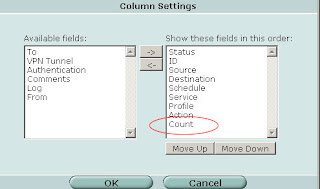
Now your policies will show the "Count" column with indicates the number of times the policy has been invoked and the number of bytes transferred. Start your investigation with any rules that are "0/0" (i.e. not in active use) and continue by working on rules that have a low hit/byte count.
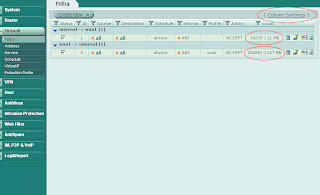
If you are running FortiOS 3.0 MR5 Patch 3 and later an easy way to see if your firewall policies are still being used is to modify the "Column Settings" under Firewall -> Policy. Select "Count" and click the right arrow to move it from "Available fields" to "Show these fields in this order".

Now your policies will show the "Count" column with indicates the number of times the policy has been invoked and the number of bytes transferred. Start your investigation with any rules that are "0/0" (i.e. not in active use) and continue by working on rules that have a low hit/byte count.

Labels:
fortigate,
gui,
troubleshooting


Monday, October 13, 2008
Bulk Command Import
Ever had to move a firewall configuration to a different hardware platform with different interface names? Ever had to create a gazillion new objects and paled at the prospect of spending hours in front of the web GUI?
A very handy but somewhat hidden feature to relieve you from your nightmares is the bulk import of CLI commands. Sure, you can copy a text document and paste it into an SSH CLI session. However I have noticed in the past that this does not always work terribly well. A good way to make sure all commands are successfully transferred is the "Import Bulk CLI Commands" menu. You can find it under System -> Maintenance -> Backup & Restore Tab: Advanced. Click on the blue triangle next to "Advanced" to expand the section and make it visible.
A very handy but somewhat hidden feature to relieve you from your nightmares is the bulk import of CLI commands. Sure, you can copy a text document and paste it into an SSH CLI session. However I have noticed in the past that this does not always work terribly well. A good way to make sure all commands are successfully transferred is the "Import Bulk CLI Commands" menu. You can find it under System -> Maintenance -> Backup & Restore Tab: Advanced. Click on the blue triangle next to "Advanced" to expand the section and make it visible.
- Prepare a plain text file with all the commands you want to import
- Below "Import Bulk CLI Commands" click "Browse"
- Select the text file which contains your firewall commands
- Click "Import Now"
Subscribe to:
Posts (Atom)